30 documents a month, free, no card
Fill Word, Excel and PowerPoint templates from JSON
Send a .docx, .xlsx or .pptx and your data, and get the filled Office file, a PDF, or both back in one request. DocMint tells you exactly which fields a template needs before you send data — and refuses to render a document with one missing.
- No card, key over the API
- A failed render costs nothing
- Runs in the EU
- .docx .dotx .docm
- .xlsx .xltx .xlsm
- .pptx .potx .ppsx .pptm
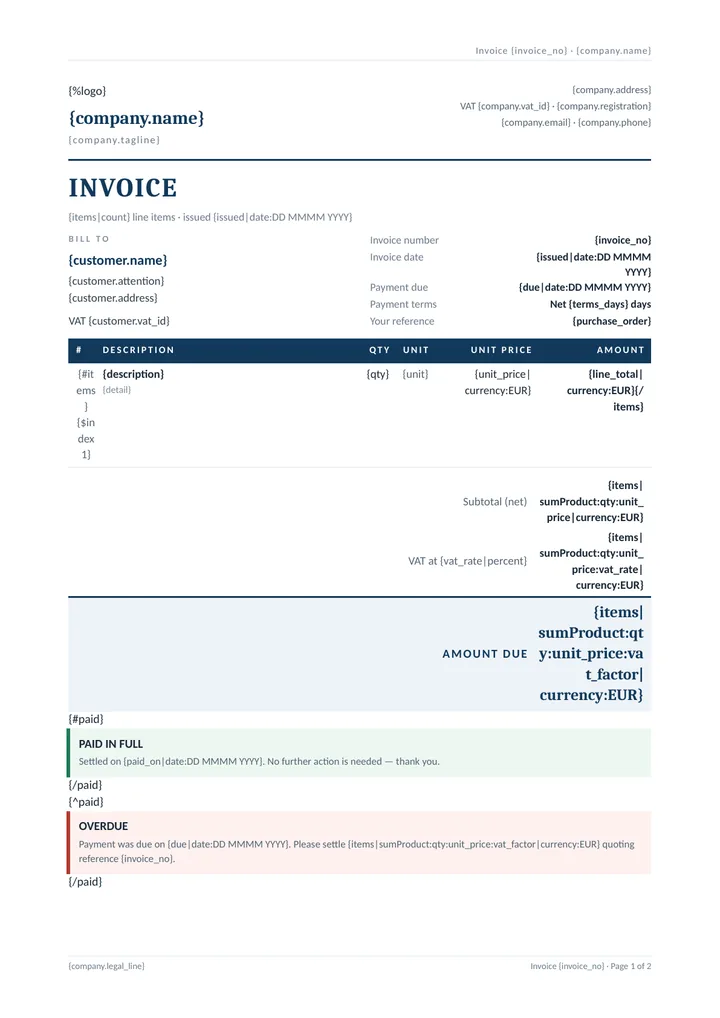
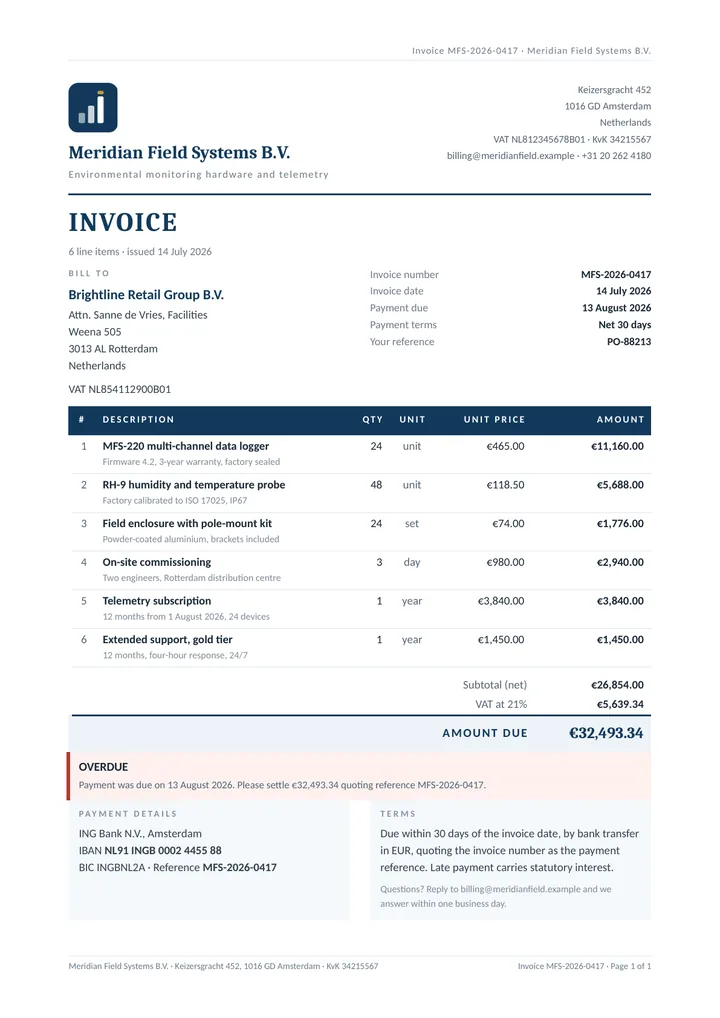
{ "template": "invoice",
  "output": "pdf",
  "data": {
    "invoice_no": "MFS-2026-0417",
    "customer": {
      "name": "Brightline Retail Group B.V." },
    "vat_rate": 0.21, "paid": false,
    "items": [ {
      "description":
        "MFS-220 multi-channel data logger",
      "qty": 24, "unit_price": 465 },
… 5 more items, company, bank, logo ] } }{items|sumProduct:qty:unit_price|currency:EUR} computes them.Measured on the live service on 25 August 2026, from the stats.stages object the API returns on every render. The first request after an idle period took 53 ms; the PDF path is one instance with a queue of one, so a busy moment queues rather than slows. DocMint is new — these are the only numbers there are, so they are the only ones quoted.
How it works
Three steps, and the second one is optional
You author the template in Word, Excel or PowerPoint — the tool your finance team already uses — and type placeholders into it. There is no template editor to learn and no proprietary format.
-
Upload it once, or send it inline
POST /v1/templatesstores it under a name you choose, and every upload is a new version. Or skip storage entirely and send the file astemplate_base64on every render. -
Ask what it needs
GET /v1/templates/:name/fieldsreturns the placeholder list with locations. Free, and it never throws on a field you have not supplied yet. -
Render
POST /v1/renderwith your data. Ask fordocument,pdforboth— per request, not per template.
# A saved .docx and your data. The PDF comes straight back.
curl -X POST https://docmint.app.mintapis.com/v1/render \
  -H "Authorization: Bearer dm_live_xxx" \
  -H "Content-Type: application/json" \
  -d '{"template":"quote",
       "data":{"customer":"Acme GmbH","total":1240.5},
       "output":"pdf"}' \
  --output quote.pdf
# What does this template actually need? Free, no render.
curl -H "Authorization: Bearer dm_live_xxx" \
https://docmint.app.mintapis.com/v1/templates/lines/fields
{ "name": "lines", "format": "docx", "version": 1,
"fields": [
{ "name": "items", "scope": "", "type": "array",
"repeating": true, "required": true,
"formatters": ["sumProduct", "currency"],
"locations": ["word/document.xml, table 1 row 2"] },
{ "name": "qty", "scope": "items", "type": "number",
"repeating": false, "required": true,
"locations": ["…table 1 row 2, paragraph 6"] } ],
"names": ["invoice_no","customer","items","description",
"qty","price"],
"sample_data": {
"invoice_no": "invoice no", "customer": "customer",
"items": [{ "description": "description",
"qty": 0, "price": 0 }] } }# No dashboard to click through. The key is in the response.
curl -X POST https://docmint.app.mintapis.com/v1/signup \
-H "Content-Type: application/json" \
-d '{"email":"you@example.com",
"password":"a-long-enough-password"}'
{
"email": "you@example.com",
"api_key": "dm_live_…",
"plan": { "id": "free", "name": "Free", "credits": 30 },
"note": "This is the only time the key is shown.
Store it now."
}Real output, three formats
One syntax across Word, Excel and PowerPoint
Each image below is a template from the examples folder, filled by DocMint and rendered to PDF. Both {name} and {{name}} work, everywhere, always.
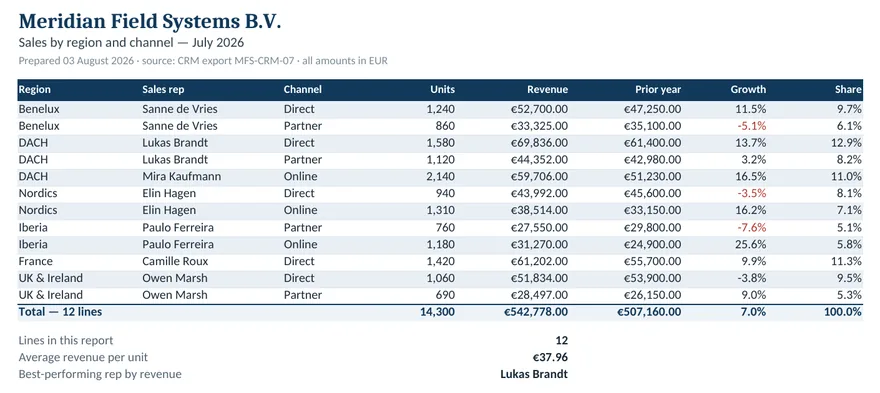
SUM() still points at the right range afterwards.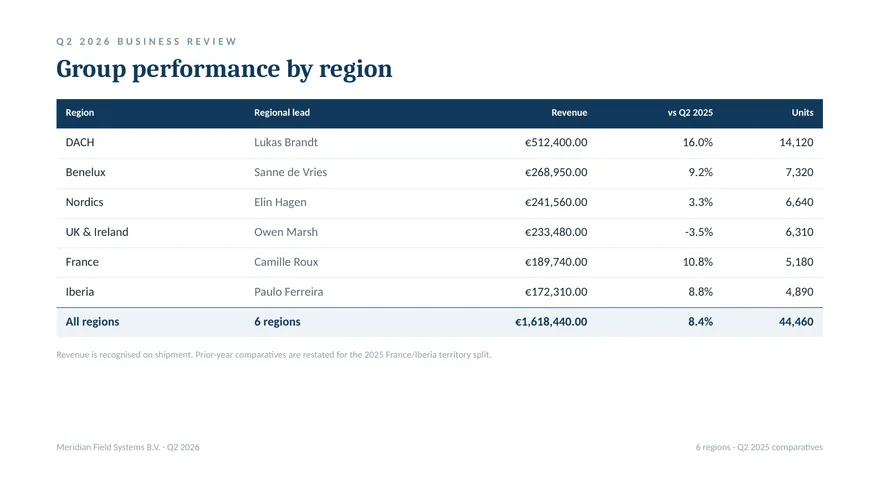
The thing nobody else does
It tells you what the template needs
Every document generator joins your data to your template by invisible string matching, and the placeholder names live inside a zipped binary a workflow cannot open. So the loop is: guess the keys, render, open the file in Word, find the silently empty field, guess again.
DocMint answers the question directly, and not with a flat list of names: a typed, nested field list that knows qty lives inside items and wants a number, plus a ready-to-POST sample_data skeleton.
GET /v1/templates/:name/fields is a first-class endpoint. It costs nothing and produces no document, because charging for the one call that prevents a bad render would be perverse.
It works by running the template through the real renderer with no data and a probe attached, so the answer is by construction exactly what a render would ask for — the same scope rules, the same section semantics, no second parser to drift.
- The sample it hands you renders. Verified against the live API:
POST /v1/inspect, thenPOST /v1/renderwith thesample_datait returned, produced a document with zero warnings on the first try. - Carbone's API has no template-introspection endpoint. Its
GET /templates/tagsreturns organisational folder labels, not placeholders. - Every existing n8n node in this space ships a raw JSON textarea. The official
n8n-nodes-carbonedeclares{name:'data', type:'json', default:'{}'}; so doesn8n-nodes-docxtemplater.n8n-nodes-fill-docxis worse — a plain string you mustJSON.stringifyyourself. - Formstack's management API does return the field list on template create — which proves the demand — but it is not surfaced in any automation UI.
{
  "format": "pptx",
  "fields": [
    { "name": "client.name", "scope": "", "type": "string",
      "repeating": false, "required": true,
      "formatters": [], "used": 4,
      "locations": ["slide 1, shape \"Subtitle 2\"",
                    "slide 2, shape \"Heading 4\""] },
    { "name": "rows", "scope": "", "type": "array",
      "repeating": true, "required": true,
      "formatters": ["count", "sum", "currency"], "used": 6,
      "locations": [
        "slide 2, table \"Items 5\", row 1, cell 3",
        "slide 2, table \"Items 5\", row 3, cell 2",
        "slide 2, table \"Items 5\", row 3, cell 3"] },
    { "name": "amount", "scope": "rows", "type": "number",
      "repeating": false, "required": true, "used": 1,
      "formatters": ["currency"],
      "locations": [
        "slide 2, table \"Items 5\", row 2, cell 3"] }
  ],
  "names": ["title","subtitle","client.name","logo","notes",
            "rows","sku","qty","amount","findings","label",
            "detail","owner"],
  "sample_data": {
    "title": "title", "subtitle": "subtitle",
    "client": { "name": "name" },
    "logo": null, "notes": "notes",
    "rows":     [{ "sku": "sku", "qty": "qty", "amount": 0 }],
    "findings": [{ "label": "label", "detail": "detail",
                   "owner": "owner" }]
  }
}
From the live API on 25 August 2026, abridged: the real response lists all 13 fields and 26 tags. scope is what makes it a tree — amount lives inside rows, not at the root — and sample_data is a skeleton you can POST straight back. An image comes back as null, because DocMint cannot invent a picture for you.
The failure this product exists to prevent
It refuses to render a document with a missing field
A document that renders a placeholder as an empty cell, or as the literal text undefined, is worse than no document at all — because nobody notices until it has been emailed to a customer.
{
  "error": {
    "code": "placeholder_unresolved",
    "message": "The template uses {price|currency} but
                the data has no \"price\".",
    "hint": "Add \"price\" to the data, or write
             {price|default:} to allow it to be absent.",
    "docs": "https://docmint.app.mintapis.com/docs#errors",
    "details": {
      "field": "price",
      "location":
        "word/document.xml, table 1 row 2, paragraph 7",
      "available": ["invoice_no","customer","items",
                    "description","qty"],
      "format": "docx"
    },
    "request_id": "dm_IHD7M11U8enL"
  }
}
Every failure carries the field name, the place it was written, the field names that do exist at that point in the data, and — when the name is close enough to be a typo — a "did you mean".
- The location is where a human would look.
word/document.xml, table 1 row 2, paragraph 7in Word,Invoice!C5in Excel,slide 2, table "Items 5", row 2, cell 3in PowerPoint. All three are real strings from the live API. - docxtemplater writes the literal word "undefined" into the document by default, and sells finding out where a tag failed as a separately-licensed 500 EUR/year module.
- A typo'd tag in Carbone does not error; it renders blank.
- A failed render costs no credits. The reservation is taken before the work and refunded when the work fails.
A value that is present but null renders as empty — you said "nothing here" and were believed. {x|default:—} is the sanctioned opt-out, and onMissing: "empty" relaxes the rule wholesale if you really want it.
The bug that prints the same value on every row
It warns when a tag inside a loop came from outside it
Scopes nest outwards, so inside {#items} a tag can legitimately reach the invoice's {currency} at the root. That convenience has a nasty edge: if your rows have product_name and you write {name}, and name happens to exist at the root, every row silently prints the same value. Nothing errors. The document looks plausible. It is wrong.
DocMint still allows it — {currency} from the invoice root is a reasonable thing to write — but it reports every occurrence back in the render response, naming the field, the location, and the fields the loop item actually has. Setting strictScope: true turns the warning into a 422.
- No competitor reports this. docxtemplater's own documentation presents
{#products}{name}{/products}, wherenameexists only at the root, as normal behaviour. - When the outer name looks like a typo of an item field, it is an error, not a warning. Reaching outwards for something the item nearly has is not a deliberate reach.
"warnings": [
  {
    "code": "resolved_from_outer_scope",
    "field": "currency",
    "location":
      "word/document.xml, table 1 row 2, paragraph 5",
    "message": "{currency} is not a field of the loop item;
                it was taken from 1 level further out, so it
                prints the same value on every row.",
    "item_fields": ["title", "amount"]
  }
]{
"code": "placeholder_outside_loop",
"message": "{currency} is not a field of the loop item.",
"hint": "strictScope is on, so a tag inside a loop must
name a field of the item. Write {../currency} if
you meant the value from outside the loop.",
"details": {
"field": "currency", "available": ["title", "amount"],
"location":
"word/document.xml, table 1 row 2, paragraph 5" }
}The details that decide whether a template survives
Built for templates people actually edit
Both brace styles
{name} and {{name}} both work in all three formats. A template written for docxtemplater and one written for Docupilot both render unchanged; no third syntax was invented.
Totals computed, not typed
{items|sumProduct:qty:price|currency}. An invoice template that writes its own total is an invoice template that is wrong the first time a line changes.
Real-world templates
Word stores {{na+me}} as two runs the moment you edit the middle of a word. Every part is flattened and re-sliced, so a template that has been through Google Docs still works.
Numbers stay numbers
A cell holding the text "1234.5" is not a number: SUM() over a column of them returns 0 and nothing warns anybody. A cell that is one placeholder resolving to a number becomes a real numeric cell, keeping its format.
Integrations
From a workflow tool, a script or a month-end run
DocMint returns the file and leaves the delivering to whatever called it. These are the ways in that exist today.
n8n — the verified community node
n8n-nodes-docmint is the official node, built and published by the people who run the API. n8n Cloud and npm both serve 0.2.1; install it from the Nodes panel under More from the community, or from Settings → Community nodes on self-hosted n8n.
Plain HTTP, any language
Everything is one JSON request: sign up, upload a template, ask for its fields, render. Anything that can send an HTTPS POST with a bearer token can use it — curl, a Code node, a backend job. GET /v1/capabilities describes the running service without a key.
Batch, async jobs and webhooks
POST /v1/render/batch renders one template against many data sets in one call; POST /v1/jobs queues work that outlives the connection, and a webhook reports the result without being asked.
Against the Office document generators
What is actually different
Everything in this table was read off the vendors' own documentation and pricing pages, and everything in the DocMint column is verifiable against the live API on this domain.
| Behaviour | DocMint | Carbone | Docupilot | Formstack Documents |
|---|---|---|---|---|
| Tells you the template's fields | Yes — GET /v1/templates/:name/fields, free |
No introspection endpoint | Not published | On template create, via the management API — not in any automation UI |
| A placeholder your data does not have | HTTP 422, naming the field and its location | Renders blank, no error | Not published | Not published |
| Loop tag resolved from an outer scope | Warned on every render; an error under strictScope |
No competitor reports it | ||
| Output format | Per request — document, pdf or both |
Per request | Fixed per template in their dashboard | Not published |
| Billing unit | One credit per document produced; a PDF costs one more | Payload size: (JSON + images + PDF bytes) / 1,000,000. A 2.3 MB render costs 3 documents. |
Per delivery. "Downloading generated document also consumes 1 credit." | Per delivery |
| At the quota ceiling | 402 until the next calendar month; no overage billing | Not published | Hard stop: "You will not be able to generate documents once you have hit 100% limit." | Not published |
| Entry price | $9 / 2,000 docs = $0.0045 | EUR 29 / 1,000 = EUR 0.029 | $29 / 100 = $0.29 | $250/mo annual / 250 deliveries = $1.00+ |
Scroll the table sideways to see every column.
Sources: each vendor's published pricing and documentation, read on 25 August 2026. "Not published" means exactly that — the vendor does not document the behaviour, and it was not guessed at. Deliberately absent from this table: APITemplate.io, which is often listed as a competitor here but has no Word, Excel or PowerPoint support of any kind — its live v2 API contains no docx endpoint and cannot accept a .docx even as input. Comparing against it on Office features would be a false comparison, so it is not made.
Pricing
One credit per document
A document costs one credit. Converting it to PDF costs one more, because LibreOffice costs roughly a hundred times the CPU of the fill itself and pretending otherwise would mean the cheap path subsidising the expensive one. Nothing else is metered — asking what fields a template needs is free, and so is downloading a template you already uploaded.
Enough to wire a workflow end to end and see it work before deciding anything.
Get a keyA steady invoice or report flow out of one workflow.
Start a subscriptionThe same $29 that buys 100 documents at Docupilot buys 20,000 here.
Start a subscriptionBulk statement, payslip and certificate runs.
Start a subscriptionQuotas are per calendar month and reset on the 1st. A failed render is refunded, so a 422 on a missing field costs nothing. How quota works.
Read this before you build on it
What DocMint does not do yet
Not everything is in our favour, and a landing page that only lists strengths is a landing page you will find out the truth about later, at a worse moment.
aggSum and cumSum, an i18n system, currency conversion at live rates, and drop/keep block operators. Ours is 43 formatters covering the common cases.
.docm, .xlsm or .pptm is filled correctly and keeps its macro-enabled extension and content type, but the macros are not guaranteed to survive the rewrite. The render response says so, as a warning.
SUM(B3:B3) over a per-group subtotal — widens to cover the rows in between. Chart series and pivot caches keep their own copies of ranges and are not rewritten. Column loops and sheet loops are not supported at all.
n8n-nodes-docmint is the official node for this service: we build and run DocMint and publish the package, so the node and the API it calls are maintained by the same people. n8n Cloud serves version 0.2.1; npm serves 0.2.1; find DocMint in the Nodes panel under More from the community and install it as an owner or admin. Self-hosted n8n can install the same release from Settings → Community nodes. The plain HTTP Request route remains available when your organisation does not allow community nodes — all three routes are written out here.
Questions
The ones that come up first
What does a template look like?
A perfectly ordinary .docx, .xlsx or .pptx with placeholders typed into it: {customer.name}, {{invoice_no}}, {#items}…{/items} around a table row, {%logo} where a picture goes. Nothing else changes; the file still opens in Word, and your finance team can keep editing it.
Do I have to upload the template?
No. Send it as template_base64 on the render call and nothing is stored. Uploading it once and referring to it by a name you choose is usually nicer, because replacing the letterhead then does not mean editing every workflow that used it.
What happens if my data has an extra field the template does not use?
Nothing — extra data is ignored. It is the other direction that is an error: a placeholder with nothing behind it.
Does a failed render cost a credit?
No. The credit is reserved before the work and refunded if the work fails, so a 422 on a missing field costs nothing.
Are my documents stored?
For a synchronous call, rendered documents are not stored — they are produced in memory and returned in the response. An async job's output is kept as a download link that expires 24 hours after the job finishes. Templates you upload are stored, because that is what uploading them means. The privacy policy lists every row of every table.
Why is the PDF so much slower than the Office file?
Because it is a different kind of work. Filling a template is XML surgery in a few milliseconds; converting to PDF is a full LibreOffice process, measured at about 2.7 s on this instance and 219 MB of peak memory. That is also why a PDF costs two credits and why conversions run one at a time.
Which brace style should I use?
Whichever you already type. {name} is the docxtemplater and Carbone style; {{name}} is the mustache and n8n style. Both work everywhere, and {{[Field With Spaces]}} works too, because that is the Docupilot form.
Is anything in my template or data used to train a model?
No. Nothing is read, mined, sold or used to train anything, and the only email the service sends is a password-reset link, when you ask for one.
Before you decide
Written out in full, including the parts against us
Every competitor price on these pages was read off the vendor’s own page on 29 August 2026, and every DocMint number was measured against this API the same day. Each one names the cases where you should pick the other product.
sumProduct instead of typed into the data, the PAID / OVERDUE condition, and the request that renders it — with the template and data to download.
Who runs this
DocMint is built and operated by productivity-boost.com Betriebs UG (haftungsbeschränkt) & Co. KG in Passau, Germany. It is new, it is small, and the honest limits are listed above rather than buried in a footnote.
The document fill engine has no third-party dependencies — no docxtemplater, no Carbone, no JSZip. The only external program is LibreOffice, run as a separate process for the optional PDF step. The full list is in THIRD-PARTY-NOTICES.md.
Fill your first template in about a minute
Sign up over the API, upload a .docx, ask it what fields it needs, and render. Thirty documents a month, free, no card.