Generating invoices from a Word template
An invoice is the document most people first try to generate, and the one where a silent mistake costs the most: a total that does not match its lines, a blank VAT number, a banner that says OVERDUE on a paid bill. This page takes one real invoice template apart — what is written in it, the JSON that fills it, the request that renders it, and what DocMint says when the data is incomplete.
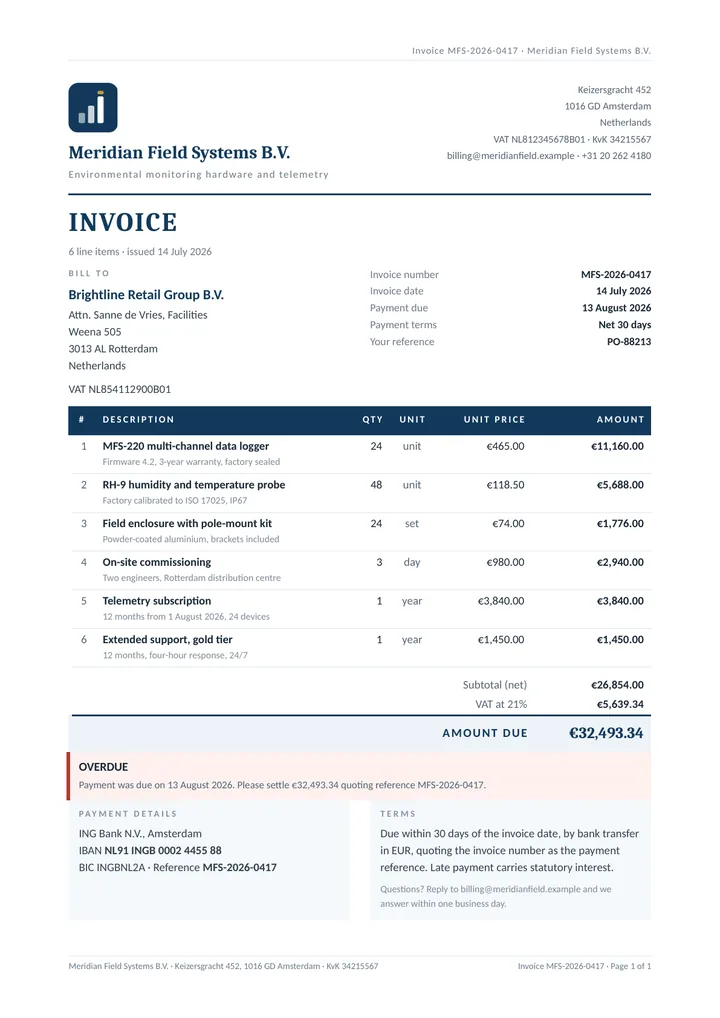
Everything here uses examples/invoice.docx and examples/invoice.data.json from the DocMint repository. The images were produced on 26 September 2026 by DocMint's own renderer and converted to PDF by the service's LibreOffice image. You can download all three files and repeat it.
The template and the result#
What is written in the template#
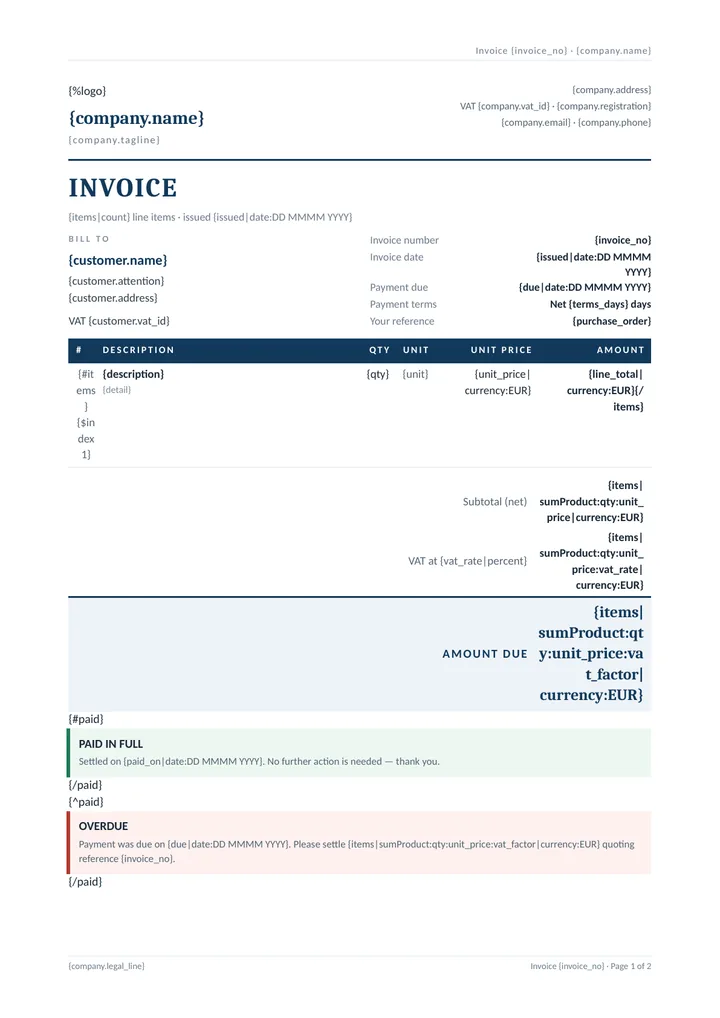
The template is an ordinary Word document. Nothing in it is DocMint-specific except the text in braces, and it still opens and edits in Word. It uses 47 tags, which boil down to these patterns:
| In the template | What it does |
|---|---|
{company.name}, {customer.address} | A value, reached by dotted path. customer.address is one string with newlines in it; they become line breaks inside the paragraph. |
{%logo} | An image: the data carries a base64 PNG with a width, and the renderer places it. |
{#items} … {/items} | A row loop. The opening tag sits in the first cell of the line row and the closing tag in the last, so the whole table row repeats once per line item. |
{$index1}, {items|count} | The line number, counting from 1, and "6 line items" in the heading. |
{issued|date:DD MMMM YYYY} | An ISO date in the data, printed as "14 July 2026". |
{unit_price|currency:EUR} | A number in the data, printed as "€465.00" in the request's locale. |
{#paid} … {/paid} and {^paid} … {/paid} | A condition and its inverse. With "paid": false the red OVERDUE banner is rendered and the green PAID IN FULL one is removed, leaving no empty coloured bar behind. |
| header and footer | Invoice {invoice_no} in the running header and again in the footer, next to Word's own page field. |
Both brace styles work: {invoice_no} and {{invoice_no}} mean the same thing. The full syntax is in the template syntax reference.
Totals the template computes#
None of the three totals is in the data, and none is typed into the template. They are computed from the line items when the document is filled:
Subtotal (net)   {items|sumProduct:qty:unit_price|currency:EUR}
VAT at {vat_rate|percent}   {items|sumProduct:qty:unit_price:vat_rate|currency:EUR}
Amount due   {items|sumProduct:qty:unit_price:vat_factor|currency:EUR}
With the sample data that is €26,854.00 net, €5,639.34 VAT at 21% and €32,493.34 due. Change a quantity in the data and all three move; an invoice whose total is sent in separately is an invoice that is wrong the first time someone edits a line and forgets the total.
One honest detail: each line item carries vat_factor (1.21) next to vat_rate (0.21). The formatter pipeline can multiply a running total by a field, but it cannot add the output of one pipeline to another, so the gross total is a third sumProduct rather than subtotal + VAT. The example's verify.js checks that vat_factor is exactly 1 + vat_rate on every line, and recomputes every printed figure independently.
The request#
Send the template with the data, and ask for a PDF. Nothing is stored:
jq -n \
  --arg t "$(base64 -w0 invoice-template.docx)" \
  --slurpfile d invoice.data.json \
  '{template_base64:$t, data:$d[0], output:"pdf",
    locale:"en-GB", currency:"EUR", filename:"invoice-{invoice_no}.pdf"}' \
| curl -sS -X POST https://docmint.app.mintapis.com/v1/render \
    -H "Authorization: Bearer $DOCMINT_KEY" \
    -H 'Content-Type: application/json' \
--data-binary @- --output invoice.pdffilename is itself a template, filled from the same data, so the download is named invoice-MFS-2026-0417.pdf. Ask for "output": "document" to get the filled .docx instead, or "both" for a JSON envelope carrying the two base64-encoded (two credits, like a PDF). pdf_password adds an open password to the PDF.
For anything recurring, upload the template once and render it by name. Replacing the letterhead then means uploading a new version, not editing every workflow that sends invoices:
jq -n --arg f "$(base64 -w0 invoice-template.docx)" \
  '{name:"invoice", file_base64:$f}' \
| curl -sS -X POST https://docmint.app.mintapis.com/v1/templates \
    -H "Authorization: Bearer $DOCMINT_KEY" \
    -H 'Content-Type: application/json' --data-binary @-

jq -n --slurpfile d invoice.data.json '{template:"invoice", data:$d[0], output:"pdf"}' \
| curl -sS -X POST https://docmint.app.mintapis.com/v1/render \
    -H "Authorization: Bearer $DOCMINT_KEY" \
    -H 'Content-Type: application/json' \
--data-binary @- --output invoice.pdfEvery upload under the same name becomes a new version, and a render can pin one with template_version — see versions and rollback.
Asking what it needs#
Before sending any data, GET /v1/templates/invoice/fields (or POST /v1/inspect with the file inline) lists what the template reads. For this invoice that is 35 fields from 47 tags. It is free and renders nothing. Two entries from the answer:
{ "name": "items", "scope": "", "type": "array",
  "repeating": true, "required": true,
  "formatters": ["count", "sumProduct", "currency"], "used": 11,
  "locations": ["word/document.xml, table 3 row 2", …] },
{ "name": "qty", "scope": "items", "type": "number",
  "repeating": false, "required": true,
  "locations": ["word/document.xml, table 3 row 2, paragraph 45"] }
scope is what makes it a tree: qty lives inside items. The same answer carries a sample_data skeleton you can POST straight back. One limit worth knowing: the probe reports paid as a repeating section, because {#paid} is written the same way as a loop and the template alone cannot say which one was meant. Sending true or false works exactly as a condition.
When a line item is incomplete#
Delete unit_price from the third line item and render again. DocMint does not print an empty cell or the word undefined; it refuses, with HTTP 422, and the credit is refunded:
{
  "code": "placeholder_unresolved",
  "message": "The template uses {unit_price|currency:EUR} but the data has no \"unit_price\".",
  "hint": "Add \"unit_price\" to the data, or write {unit_price|default:} to allow it to be absent.",
  "details": {
    "field": "unit_price",
    "location": "word/document.xml, table 3 row 2, paragraph 47",
    "available": ["invoice_no", "issued", "due", …, "description", "detail", "qty", "unit", "line_total", "vat_factor"],
    "format": "docx"
  }
}
The location is the line-item row of the table, and available lists what the data does have at that point — including the item's own fields. For an optional field, {detail|default:} is the sanctioned way to allow it to be absent. The full contract is in missing fields.
A payment QR code#
The example invoice prints the bank details as text. A European invoice often also carries a SEPA payment QR code ("Girocode", EPC069-12) that banking apps read into a transfer form. DocMint draws it itself from an image tag — put {%pay} in the template and send:
"pay": { "epc": { "name": "Meridian Field Systems B.V.",
                  "iban": "NL91 INGB 0002 4455 88", "bic": "INGBNL2A",
                  "amount": 32493.34, "text": "MFS-2026-0417" } }
The IBAN is validated including its check digits and never echoed in an error. No network request is made. QR codes, Code 128 and EAN-13 barcodes are documented under images.
What a run of invoices costs#
A filled .docx is one credit; a PDF is two, because the LibreOffice conversion costs far more CPU than the fill. So the free plan's 30 credits a month are 15 PDF invoices, Starter ($9, 2,000 credits) is 1,000, and Pro ($29, 20,000 credits) is 10,000. A render that fails — like the 422 above — costs nothing.
Timing, as measured on the live service in August 2026: the fill itself takes milliseconds; the PDF step adds about 2.7 s and conversions run one at a time. A month-end run of hundreds of invoices is what POST /v1/render/batch (one template, many data sets, one call) and POST /v1/jobs with a webhook exist for.
What it does not do#
- No structured e-invoices. DocMint produces the visual invoice — the Office file or a PDF. It does not produce XRechnung, ZUGFeRD or Factur-X data, and its PDF is not PDF/A. If you are legally required to send a structured e-invoice, you need a tool that produces one.
- No numbering, no ledger. The invoice number, dates and amounts are whatever your data says. DocMint does not allocate numbers, store invoices or track payment.
- No delivery. It returns the file; sending it by email or filing it in Drive is your workflow's job.
- No SLA. One region, one instance, restarted on every deploy — the full list is under what DocMint does not do yet.
Next: the same template inside a workflow in n8n, or how DocMint compares on price and behaviour in the Word template API overview.